

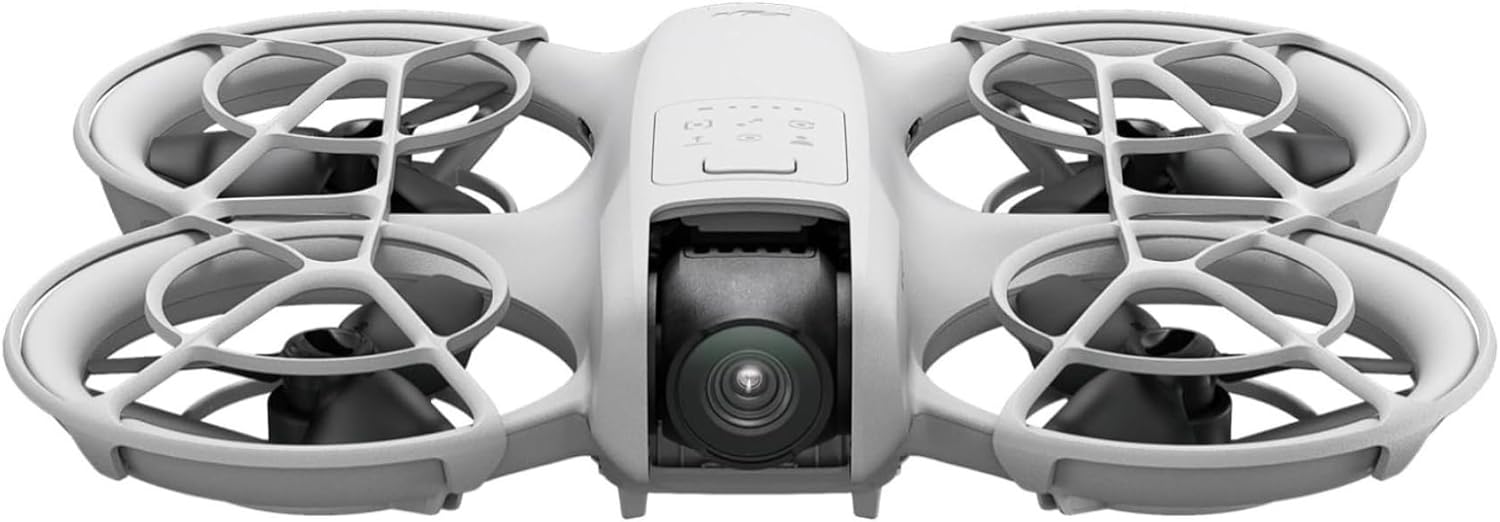
The DJI Neo is the smallest, lightest drone DJI has ever made: a 135-gram, palm-sized 4K camera drone that takes off from your hand, follows you around, and films itself — no controller required. If your idea of a drone is a flying tripod for vlogs, travel clips, and family moments rather than a long-range aerial camera, the Neo was designed specifically for you. This guide explains what it actually does, what its honest limitations are, which bundle to buy, and when a bigger DJI drone would serve you better.
Disclosure: As an Amazon Associate, we earn from qualifying purchases.
What the DJI Neo actually is
DJI launched the Neo in September 2024 as its lightest and most compact drone to date — essentially a flying selfie camera. It weighs about 135 grams, which is lighter than most smartphones, and it’s small enough to fit in a jacket pocket or purse. Its party trick is autonomy: press the mode button on top of the aircraft, pick a shooting mode (Follow, Dronie, Circle, Rocket, Spotlight, or a Custom mode), press and hold, and the Neo takes off from your palm, films you, and returns to land on your palm when it’s done.
That makes it fundamentally different from DJI’s Mini line. A Mini drone is a traditional camera drone you fly with sticks and a gimbal you aim. The Neo is a hands-free follow-me camera that happens to fly. If you want cinematic tracking shots of yourself hiking, cycling, skateboarding, or walking a beach — without learning to fly — that’s the Neo’s entire reason to exist.
Who the DJI Neo is for — and who should skip it
The Neo is a great fit if you are:
- A solo vlogger or travel creator who wants hands-free follow footage without a cameraman. The Neo is the cheapest way into genuinely self-flying 4K video.
- A beginner who finds a full camera drone intimidating. Palm takeoff, one-button modes, full-coverage propeller guards, and a 135g frame make it one of the most forgiving drones to start with.
- A family documentarian — birthdays, BBQs, picnics, hikes with friends. The Neo films group moments from the air in seconds.
- A traveler who wants a drone that disappears into a pocket and doesn’t trigger registration paperwork (see the rules section below).
Skip the Neo if you are:
- A photographer/videographer chasing image quality. The 1/2-inch 12MP sensor and single-axis gimbal are a big step down from the DJI Mini 4 Pro (1/1.3-inch 48MP) or the DJI Mini 5 Pro (1-inch 50MP).
- A long-range or windy-conditions flyer. The Neo is built for close-range shots, not distance work, and 135g gets pushed around by gusts.
- An FPV pilot. The Motion combo gives a taste of first-person flight, but real FPV racing is a different world — start with our beginner’s guide to FPV racing gear and the best FPV racing kits for beginners.
- Someone who flies near trees, walls, or crowds regularly. The Neo has no obstacle sensing (more on that below) — you’ll be the safety system.
Flying without a controller: palm takeoff and the mode button
This is the Neo’s defining feature, so it’s worth understanding exactly how it works. The aircraft has a mode button on top. With no controller, no phone, and no app open, you press it to cycle through the intelligent shooting modes, then press and hold to launch. The Neo lifts off from your palm, performs the selected shot, and comes back to land on your outstretched hand when it finishes — or you can place your hand under it at any time and it will land.
The six smart shots selectable directly on the aircraft are:
- Follow: the drone tracks behind you as you move — the vlogging workhorse.
- Dronie: flies up and backward for a rising reveal shot.
- Circle: orbits around you.
- Rocket: climbs straight up filming straight down.
- Spotlight: locks onto you and rotates to keep you centered while it hovers.
- Custom: a mode you configure yourself in the DJI Fly app.
Two more QuickShots — Helix and Boomerang — are available once you connect the DJI Fly app. In the app you can also tune each mode: follow distance, circle radius, tracking angle, and similar parameters.
AI subject tracking: what “follows you” really means
The Neo’s AI subject tracking keeps you in frame as you walk, run, cycle, or skate. DJI rates tracking at up to about 8 m/s, which comfortably covers walking and jogging pace and moderate cycling — but fast downhill biking or sprinting will outrun it. Tracking uses the camera’s view of you, so it works best in good light with clear contrast between you and the background, and it works in both directions (front and rear tracking).
One important note from reviewers: because the Neo has almost no obstacle sensing (see below), tracking flights are entirely your responsibility to supervise. DJI’s own guidance is to eyeball your flight path and keep tracking runs in open space.
The camera, in practical terms
The Neo carries a 1/2-inch, 12-megapixel sensor (f/2.8, 117.6° field of view) shooting 4K at 30fps or 1080p at 60fps, at up to 75 Mbps. Stabilization comes from a single-axis mechanical gimbal (tilt) paired with electronic stabilization (DJI’s RockSteady and HorizonBalancing algorithms). What does that mean in practice?
- Daylight video looks good. In bright conditions, the 4K/30 footage is crisp, smooth, and perfectly usable for YouTube, Instagram Reels, and TikTok.
- Low light is the weakness. A 1/2-inch sensor is small by 2026 standards — night and indoor footage gets noisy. This is the single biggest image-quality reason to step up to a Mini 4 Pro or Mini 5 Pro if you shoot after dark.
- 4K/30 is the ceiling. There’s no 4K/60 or slow-motion at 4K — 1080p/60 is as slow as it goes. If slow-mo matters to you, look elsewhere.
- The wide 117.6° lens is great for selfie-style framing but distorts at the edges — fine for action, less ideal for flattering portraits.
- Stills are 12MP JPEGs. Fine for social sharing; nobody is printing these large.
Flight time, wind handling, and honest range
- Flight time: DJI rates the Neo at up to 18 minutes per battery (about 17 with the propeller guards fitted) — that’s DJI’s lab figure, measured in calm conditions. Real-world flights in any wind will be shorter. The 1,435 mAh battery charges in about 50 minutes directly in the aircraft, or about 60 minutes for three batteries in the charging hub.
- Wind resistance: Level 4, rated to 8 m/s. In plain terms: the Neo handles a light breeze, but at 135g it gets visibly pushed around by gusts. Multiple reviewers flag this as the drone’s main handling weakness — keep tracking flights to calm days.
- Speed: 6 m/s in Normal mode, 8 m/s in Sport, and up to 16 m/s in Manual mode (Manual requires a compatible controller).
- Range: this depends entirely on how you fly it. Palm/phone control over Wi-Fi is a short-range affair — about 50 meters. With the RC-N3 controller and DJI’s O4 transmission, DJI rates up to 10 km (FCC) or 6 km (CE) in open, interference-free conditions — but the Neo is built for close-range shots, and you should always keep it within visual line of sight regardless.
- Positioning: GPS + Galileo + BeiDou satellite positioning, 2,000 m max takeoff altitude, and an operating range of −10° to 40°C.
The biggest limitation: no obstacle avoidance
Let’s be blunt, because this is the thing that catches buyers out: the DJI Neo has no obstacle sensing in any direction. The only vision system onboard points downward, purely for stable hovering (0.5–10 m above the ground). There is no forward, backward, or side sensing whatsoever.
In practice this means the Neo will happily track you straight into a tree branch, a wall, or a powerline. The full-coverage propeller guards soften bumps at close range, and 135g of drone doesn’t hit hard — but a tracking shot through a forest is a crash waiting to happen. Fly it in open space, keep your eyes on it during follow flights, and treat the “obstacle avoidance” question as the main reason to consider the newer Neo 2, which adds omnidirectional sensing. This is also why the Neo is strictly a visual-line-of-sight, supervised drone — never a “launch it and look at your phone” toy.
Storage: 22GB internal, and no microSD slot
The Neo has 22GB of built-in storage and no microSD card slot — a genuine constraint on a video drone. DJI says that’s enough for about 40 minutes of 4K/30fps footage or 55 minutes of 1080p/60fps. In practice, that means offloading footage regularly: transfer wirelessly to your phone via Wi-Fi (QuickTransfer) or plug into a computer with a USB-C cable. If you shoot a lot in a day — a full travel day, an event — bring a phone with free space and get into the habit of transferring between flights. There is no way to expand storage, so heavy shooters should take this seriously.
Every way you can control the Neo
The Neo is unusually flexible about control — it’s one of the few DJI drones where the controller is genuinely optional:
- Palm / button control: no phone, no controller. Select a smart shot on the aircraft button and launch from your hand. The purest Neo experience.
- DJI Fly app (smartphone): connects over Wi-Fi (about 50 m) for a live view, camera settings, tuning the smart shots, and virtual-stick manual flying. Android users note: DJI Fly was removed from Google Play, so download the app from DJI’s official website before you fly — and activate the drone in the app first.
- Voice control: through the DJI Fly app, in English or Mandarin — say “take off” style commands for truly hands-free operation.
- RC-N3 controller: traditional stick control with DJI O4 transmission (up to 10 km FCC / 6 km CE), 1080p/60fps live view, and access to Manual mode at 16 m/s.
- RC Motion 3 + Goggles N3: first-person immersive flying with motion control — this is what the Motion Fly More Combo is built around.
- FPV Remote Controller 3: for pilots who want conventional FPV sticks with the Neo.
Base vs Fly More vs Motion Fly More: which bundle to buy
- DJI Neo (base): the drone, one battery, propeller guards, and the essentials. Ready to fly controller-free or with your smartphone out of the box. Buy this if you only want selfie clips and follow shots and don’t mind 18 minutes per outing.
- DJI Neo Fly More Combo: adds the DJI RC-N3 controller, three batteries total, and a two-way charging hub. Three batteries means roughly triple the flying per outing (around 54 minutes of DJI-rated flight time), and the RC-N3 unlocks real stick control and long-range O4 transmission. This is the combo most people should buy — one battery is over too fast, and the controller transforms what the drone can do.
- DJI Neo Motion Fly More Combo: the same 135g Neo bundled with the DJI RC Motion 3 controller, DJI Goggles N3, three batteries, and a two-way charging hub. This is for immersive, FPV-style flying — you see what the Neo sees and steer with wrist motion. Everything else — 4K ultra-stabilized video, palm takeoff and landing, subject tracking, QuickShots, full-coverage propeller guards — is the same Neo. Buy it only if FPV flight is specifically what you want; it’s a taster of the FPV world, not a racing drone.
Registration and flying rules
At 135g, the Neo sits well under the weight thresholds that trigger most paperwork:
- United States: recreational flights of sub-250g drones generally do not require FAA registration. The Neo does not broadcast Remote ID. Rules change, so check the current FAA guidance before you fly — and commercial (Part 107) operators should verify their requirements separately.
- European Union: the Neo is a C0-class drone, which places it in the A1 subcategory — the lightest-touch category, flyable close to people with minimal requirements. Check your national aviation authority for the current specifics.
- United Kingdom: sub-250g drones fall under the lightest rules — no Operator ID required for recreational sub-250g flight, but the Drone Code (keep it in sight, stay below 120 m, stay away from airports and crowds) still applies. Verify current CAA guidance before flying.
Neo 2 vs Neo: is the upgrade worth it?
DJI has since released the Neo 2, and it’s worth knowing what your extra money would buy: a 2-axis gimbal (vs 1-axis), 4K/60fps video (4K/100fps with a controller), omnidirectional obstacle sensing with a forward LiDAR sensor, 49GB of internal storage (vs 22GB), Level 5 wind resistance (vs Level 4), faster 12 m/s tracking (vs 8 m/s), and about 19 minutes of flight time. It’s slightly heavier at 151g but still sub-250g and C0-class.
The honest read: the Neo 2 fixes the original Neo’s two biggest weaknesses — no obstacle sensing and the small, slow-to-fill storage. If your budget stretches to it and you plan to fly near anything (trees, buildings, people), the Neo 2 is the safer buy. The original Neo remains the cheapest way into self-flying 4K video, and if you fly in open spaces and offload footage regularly, it does the job for less.
How the Neo compares to DJI’s Mini line
The Neo isn’t competing with the Minis on camera quality — it’s competing on convenience. Here’s the honest landscape:
| Drone | Camera | Weight | Best for |
|---|---|---|---|
| DJI Neo | 1/2″ 12MP, 4K/30, 1-axis gimbal | 135g | Hands-free selfies, vlogs, beginners |
| DJI Mini 4 Pro | 1/1.3″ 48MP, 4K/60 HDR | Sub-249g | Creators wanting real camera quality |
| DJI Mini 5 Pro | 1″ 50MP, 4K/60 HDR, 225° gimbal | Sub-249g | Image-quality maximizers, low light |
| DJI Mavic 4 Pro | 4/3″ 100MP Hasselblad tri-camera | ~1,063g | Professionals (registration required) |
The pattern: every step up the line buys you a bigger sensor, a better gimbal, and longer flight — and loses the Neo’s palm-launch, controller-free simplicity. If what you actually want is a flying camera you operate with sticks, the DJI Mini 3 remains the budget entry point into proper camera drones, while the Mini 4 Pro is the creator favorite. The Neo wins only when hands-free, follow-me shooting is the job.
Quick answers
Can the DJI Neo really fly without a controller?
Yes. Press the mode button to pick a smart shot, press and hold to launch from your palm, and it lands back on your palm when done. A phone or controller is optional.
Does the DJI Neo follow you automatically?
Yes — AI subject tracking keeps you framed at up to about 8 m/s (DJI’s figure), covering walking, jogging, and moderate cycling. Keep tracking flights in open space: there is no obstacle avoidance.
How long does the DJI Neo battery last?
Up to 18 minutes per battery (about 17 with propeller guards) per DJI’s lab figures; real-world flights are shorter in wind. The Fly More combos include three batteries for roughly triple the flying per outing.
Does the DJI Neo need registration?
At 135g, recreational sub-250g flights in the US generally don’t require FAA registration, and it’s C0-class in the EU. Always check current rules in your country before flying.
Can you put a microSD card in the DJI Neo?
No. It has 22GB of internal storage only — about 40 minutes of 4K/30fps per DJI — and footage transfers to your phone over Wi-Fi or to a computer via USB-C.
Is the DJI Neo good in wind?
It’s rated Level 4 (8 m/s), but 135g is very light — gusts push it around noticeably. It’s a calm-day drone for tracking shots.
Disclosure: As an Amazon Associate, we earn from qualifying purchases.
